Sequence metafile editor (EditSequenceFile)
\tableofcontents
This is a command-line tool for editing sequence metafiles. Operations include deleting frames from a file (TRIM command), append sequence metafiles (APPEND command), adding/deleting/changing data fields (…FIELD… commands), compress/uncompress the image data (–use-compression switch).
Examples
Generate sequence metafile that contains ImageToReference transforms
EditSequenceFile.exe --operation=ADD_TRANSFORM --add-transform=ImageToReference --config-file=PlusDeviceSet_fCal_Sim_VolumeReconstruction.xml --source-seq-file=fCal_Test_Calibration_3NWires_fCal2.0.mha --output-seq-file=test.mha
Multiple transforms can be added, the names are separated by commas (do not add spaces):
EditSequenceFile --operation=ADD_TRANSFORM --add-transform=ImageToReference,ProbeToReference,TrackerToReference --source-seq-file=fCal_Test_Calibration_3NWires_fCal2.0.mha --output-seq-file=test.mha
Compress a sequence metafile
EditSequenceFile.exe --source-seq-file=[inputFilePath] --output-seq-file=[outputFilePath] --use-compression
Uncompress a sequence metafile
EditSequenceFile.exe --source-seq-file=[inputFilePath] --output-seq-file=[outputFilePath]
Trim a long sequence
Create a small test data file from the first 24 frames of a tracked ultrasound metafile:
EditSequenceFile --operation=TRIM --first-frame-index=0 --last-frame-index=23 --source-seq-file=e:\data\AdultScoliosis-T2.mha --output-seq-file=e:\data\AdultScoliosis-T2-24frames.mha
Use fill image rectangle for anonymization
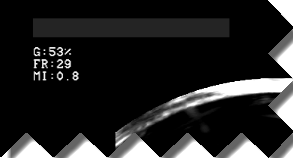
Anonymization of sequences that contain patient information burnt into the pixels is enabled by the FILL_IMAGE_RECTANGLE operation, e.g.,
EditSequenceFile --operation=FILL_IMAGE_RECTANGLE --fill-rect-origin 52 25 --fill-rect-size 260 25 --fill-gray-level=20 --source-seq-file=SegmentationTest_BKMedical_RandomStepperMotionData2_Trimmed.mha --output-seq-file=SegmentationTest_BKMedical_RandomStepperMotionData2_Trimmed_Anonymized.mha
Input image:
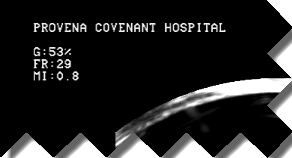 Image after fill rectangle operation:
Remove image data from meta file, keep only the transforms
Saves only the tracker data from a meta file that has both tracker and image data.
EditSequenceFile --operation=REMOVE_IMAGE_DATA --source-seq-file=[inputFilePath] --output-seq-file=[outputFilePath]
Add a constant transform to each frame
EditSequenceFile --operation=UPDATE_FRAME_FIELD_VALUE --source-seq-file=[inputFilePath] --output-seq-file=[outputFilePathTmp] --updated-field-name="StylusTipToStylusTransform" --updated-field-value="1  0  0  182.18    0  1  0  0.0744143    0  0  1  14.3197    0  0  0  1"
EditSequenceFile --operation=UPDATE_FRAME_FIELD_VALUE --source-seq-file=[outputFilePathTmp] --output-seq-file=[outputFilePath] --updated-field-name="StylusTipToStylusTransformStatus" --updated-field-value="OK"
Mix multiple sequence files into one
Create one sequence file that contains video of the first sequence and transforms from all others.
EditSequenceFile --operation=MIX --source-seq-files [videoInputFilePath] [transform1InputFilePath] [transform2InputFilePath] --output-seq-file=[outputFilePath]
Command-line parameters reference
\verbinclude “EditSequenceFileHelp.txt”